Condition Editor
Condition Rule
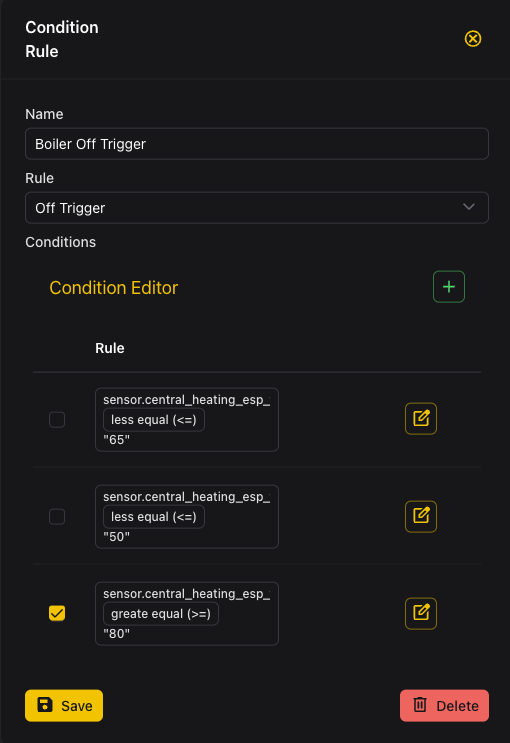
To controll the behavior of devices in PowerMaster based on specific criteria, you can use the Condition Editor. This tool allows you to create, edit, and manage conditions that dictate how devices respond to various states.
Condition Types
Off Trigger
The off Trigger turns of the device when the specified condition is met. For example, you can set a condition to turn off a heater when the temperature exceeds a certain threshold.
On Trigger
The on Trigger activates the device when the specified condition is met. For instance, you can set a condition to turn on a fan when the humidity level drops below a certain point.
Off Condition
The off Condition must be true for the device to be able to turn off. This is useful for ensuring that certain criteria are met before deactivating a device.
On Condition
The on Condition must be true for the device to be able to turn on. This ensures that specific conditions are satisfied before activating a device.
Conditoin Management
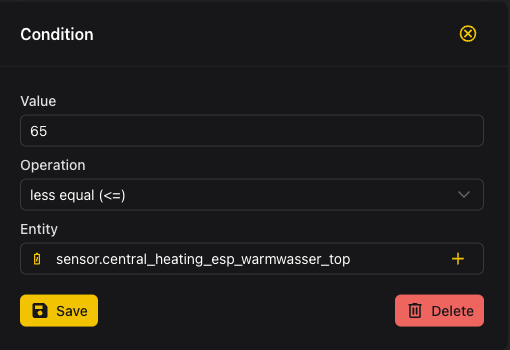
The Condition is the comparison of a value to a static value. For example we compare the hass sensor of the boiler temperature to a static value of 22°C. To specify the comparison you can select a operation.
- equals (==)
- greater than (>)
- less than (<)
- greater than or equal (>=)
- less than or equal (<=)
- contains (for strings)